The Best Software Tools for Dissertation Writers Discover essential software tools for dissertation writing, including reference management tools, writing aids, and project management apps that streamline the writing process
 : 525
: 525
Writing a dissertation is a complex, multi-step process that demands not only scholarly insight but also exceptional organization, productivity, and attention to detail. Fortunately, there are many software tools available today that can streamline the writing process, making your academic journey more efficient and less stressful. In this guide, we explore essential software tools for dissertation writers, including reference management tools, writing aids, and project management apps that help you stay organized, maintain focus, and produce a polished final product.
1. The Dissertation Journey: A Software-Driven Approach
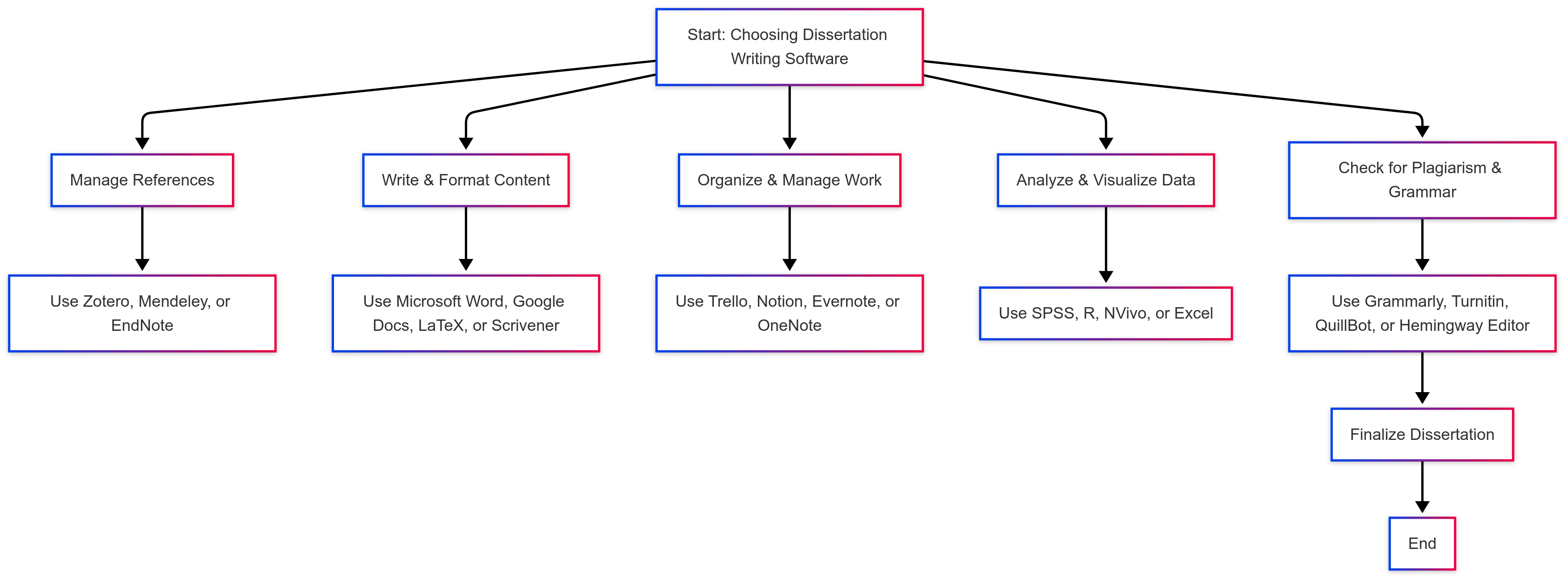
Dissertation writing involves multiple stages: researching and gathering data, drafting and writing, managing references, and revising and finalizing your work. Software tools can assist you at every step of this process, ensuring that you:
- Stay Organized: Keep your research, notes, and drafts in one place.
- Enhance Productivity: Manage your time effectively and set clear milestones.
- Maintain Academic Rigor: Ensure proper citation, formatting, and adherence to academic standards.
- Improve Writing Quality: Utilize writing aids to refine language and style.
By leveraging the right tools, you can streamline these processes and focus more on the substance of your research rather than on administrative tasks.
2. Reference Management Tools
One of the most time-consuming aspects of dissertation writing is managing and citing references. Reference management software simplifies this task by organizing your sources, generating citations, and creating bibliographies automatically.
A. Zotero
-
Overview:
Zotero is a free, open-source reference management tool that helps you collect, organize, cite, and share research sources. It works as a browser extension, allowing you to capture citation information from websites and academic databases with just a click. -
Key Features:
- Automatic Citation Extraction: Quickly capture bibliographic details from online sources.
- Organization: Use folders and tags to categorize your sources.
- Collaboration: Share libraries with peers for collaborative projects.
- Integration: Seamlessly integrates with word processors like Microsoft Word and LibreOffice for in-text citations and bibliographies.
-
Why It’s Great for Dissertation Writers:
Zotero’s user-friendly interface and robust features make it ideal for managing large volumes of references. Its open-source nature means you won’t incur any costs, which is a bonus for budget-conscious students.
B. EndNote
-
Overview:
EndNote is a widely used reference management tool favored by many academic institutions. It offers advanced features for organizing research materials and formatting citations in numerous styles. -
Key Features:
- Extensive Database Integration: Search and import references directly from various online databases.
- Customizable Libraries: Organize references using groups, smart groups, and tags.
- Collaboration: Share your reference libraries with collaborators.
- Manuscript Matching: Automatically check for journal submission requirements and format your bibliography accordingly.
-
Why It’s Great for Dissertation Writers:
EndNote is powerful and versatile, making it well-suited for complex research projects. Although it comes with a cost, many universities provide access to EndNote licenses for their students.
C. Mendeley
-
Overview:
Mendeley is both a reference manager and an academic social network. It helps you organize your research, collaborate with others online, and discover the latest developments in your field. -
Key Features:
- PDF Organization: Import, organize, and annotate PDFs.
- Collaborative Groups: Create private groups to share references and collaborate with peers.
- Citation Generation: Easily generate citations and bibliographies.
- Research Discovery: Use Mendeley’s social features to connect with other researchers and stay updated on new publications.
-
Why It’s Great for Dissertation Writers:
Mendeley’s dual role as a reference manager and social network allows you to both organize your sources and engage with the academic community. Its intuitive interface is especially helpful for managing PDFs and annotated notes.
3. Writing and Editing Tools
The quality of your dissertation’s writing is crucial for conveying your ideas effectively. Writing aids and editing tools can help refine your language, improve readability, and ensure that your document adheres to academic standards.
A. Grammarly
-
Overview:
Grammarly is a popular writing assistant that checks your work for grammar, punctuation, and style errors. It offers real-time suggestions as you type, making it easier to produce polished text. -
Key Features:
- Grammar and Spelling Checks: Detects and corrects a wide range of grammatical errors.
- Style Suggestions: Offers recommendations to improve clarity, conciseness, and readability.
- Plagiarism Checker: Compares your text against millions of web pages to ensure originality.
- Customization: Adjusts its suggestions based on your chosen writing style or academic tone.
-
Why It’s Great for Dissertation Writers:
Grammarly’s real-time feedback helps you catch errors early in the writing process, reducing the time needed for later revisions. Its ability to improve both grammar and style is invaluable for non-native speakers and anyone aiming to produce clear, professional academic writing.
B. Hemingway Editor
-
Overview:
The Hemingway Editor is a tool designed to enhance the readability of your text. It highlights complex sentences, excessive adverbs, and passive voice, guiding you toward simpler, more direct writing. -
Key Features:
- Readability Analysis: Provides a readability score and suggests improvements.
- Highlighting Complex Sentences: Identifies long, convoluted sentences that may confuse readers.
- Suggestions for Simplification: Offers actionable tips to make your writing more concise.
-
Why It’s Great for Dissertation Writers:
Hemingway Editor is particularly useful for ensuring that your dissertation is accessible and easy to read. By simplifying your language without sacrificing academic integrity, it helps ensure that your arguments are communicated effectively.
C. Scrivener
-
Overview:
Scrivener is a powerful writing software designed for long-form projects. It provides a robust environment for organizing drafts, research notes, and outlines, making it easier to manage a complex dissertation. -
Key Features:
- Project Organization: Divide your dissertation into chapters, sections, and individual notes.
- Flexibility: Easily rearrange sections and view your entire project in a single interface.
- Integrated Research Storage: Store research documents, PDFs, images, and notes within your project file.
- Distraction-Free Writing Mode: Focus on writing without external distractions.
-
Why It’s Great for Dissertation Writers:
Scrivener’s ability to organize and manage large writing projects makes it an excellent choice for dissertation writers. It allows you to break your work into manageable sections and keep all your research materials in one place, streamlining the writing process.
4. Project Management and Organizational Tools
Managing a dissertation is as much about organization and time management as it is about writing. Project management tools can help you keep track of tasks, deadlines, and progress, ensuring that you stay on schedule throughout the dissertation process.
A. Trello
-
Overview:
Trello is a flexible project management tool that uses boards, lists, and cards to organize tasks. It’s particularly useful for visualizing your progress and managing complex projects. -
Key Features:
- Task Organization: Create boards for different phases of your dissertation, such as literature review, writing, data analysis, and revision.
- Customizable Cards: Each card can represent a specific task, with deadlines, checklists, and attachments.
- Collaboration: Share boards with advisors or peers to facilitate collaboration and feedback.
-
Why It’s Great for Dissertation Writers:
Trello’s visual layout and ease of use make it an excellent tool for tracking progress and managing daily tasks. It helps break down your dissertation into manageable steps and ensures that nothing falls through the cracks.
B. Asana
-
Overview:
Asana is a comprehensive project management tool designed to help teams and individuals track work. It allows you to assign tasks, set deadlines, and monitor progress in a highly organized manner. -
Key Features:
- Task Assignment: Break your dissertation into tasks and subtasks, with the ability to set deadlines and priorities.
- Progress Tracking: Visual timelines and progress dashboards help you monitor your progress.
- Integration: Works well with other tools like calendars, email, and file-sharing platforms.
-
Why It’s Great for Dissertation Writers:
Asana’s detailed tracking features and ability to break down complex projects into smaller tasks are particularly useful for dissertation writers. It ensures that you can manage your time effectively and stay on track throughout the process.
C. Notion
-
Overview:
Notion is an all-in-one workspace that combines note-taking, project management, and collaboration tools. It is highly customizable and can be tailored to your specific dissertation needs. -
Key Features:
- Flexible Organization: Create databases, task lists, and calendars within one platform.
- Integration of Content: Combine text, images, and files in a single workspace to manage research notes and drafts.
- Collaboration: Share pages and workspaces with peers or advisors for real-time feedback.
-
Why It’s Great for Dissertation Writers:
Notion’s flexibility allows you to organize every aspect of your dissertation—from research notes and outlines to task management and progress tracking—in one centralized location. Its versatility makes it a powerful tool for managing complex projects.
5. Combining Tools for a Seamless Workflow
The best approach to dissertation writing often involves integrating multiple tools to cover all aspects of the process. Here’s how you can create a seamless workflow:
A. Integration of Reference Management and Writing Tools
-
Synchronize Your Work:
Use a reference management tool like Zotero or Mendeley in conjunction with Scrivener or Microsoft Word. These tools often offer plug-ins that allow you to insert citations and generate bibliographies directly within your document. -
Consistency Across Platforms:
Ensure that your reference library is consistently updated and that you export citations in the format required by your institution.
B. Combining Project Management with Daily Writing
-
Set Up a Project Board:
Use Trello or Asana to break down your dissertation into phases and assign daily tasks. Link these tasks to specific sections of your dissertation stored in Scrivener or Notion. -
Track Progress and Adjust:
Regularly review your project board to assess your progress. Adjust your tasks and deadlines as necessary to accommodate any changes in your research timeline.
C. Centralizing Your Research and Notes
-
Unified Workspace:
Notion or a similar tool can serve as a central repository for all your research notes, outlines, and drafts. This centralization makes it easier to locate information quickly and keep everything organized. -
Integration with Cloud Storage:
Use cloud storage services (like Google Drive or Dropbox) to back up your files and ensure that all team members or advisors can access the latest versions of your work.
A well-integrated workflow not only enhances efficiency but also reduces the cognitive load associated with managing multiple aspects of your dissertation simultaneously.
6. Best Practices for Maximizing Software Tools
To get the most out of the software tools available, consider these best practices:
A. Regularly Update Your Tools
-
Stay Current:
Software tools frequently receive updates with new features and improved functionality. Keeping your tools up to date ensures that you benefit from the latest improvements. -
Learn New Features:
Take time to explore and learn about new features or integrations that can further streamline your workflow.
B. Attend Training and Webinars
-
Online Tutorials:
Many software providers offer free tutorials, webinars, and user guides. Take advantage of these resources to enhance your proficiency. -
University Workshops:
Check if your institution offers training sessions or workshops on tools like SPSS, R, or project management software.
C. Customize Tools to Fit Your Workflow
-
Personalize Settings:
Customize your reference management tool, writing software, or project management board to suit your specific needs. Tailor layouts, templates, and notifications to keep you focused. -
Develop Standard Operating Procedures:
Create a consistent system for managing your references, notes, and drafts. This standardization can reduce errors and save time.
D. Collaborate and Share
-
Engage with Peers:
Share best practices and tips with fellow dissertation writers. Collaboration can lead to innovative ways to integrate tools and optimize your workflow. -
Utilize Cloud-Based Solutions:
Collaborate in real-time with advisors or peers using cloud-based platforms. This ensures that everyone has access to the most current version of your work.
By following these best practices, you can maximize the benefits of each tool and create a smooth, efficient workflow that supports your dissertation writing process.
7. The Long-Term Benefits of Software Tools in Dissertation Writing
Investing time in mastering these tools can have significant long-term benefits, both academically and professionally.
A. Enhanced Productivity and Organization
-
Time Savings:
Automation of tasks like citation formatting, data organization, and project tracking frees up time for critical thinking and analysis. -
Reduced Stress:
A well-organized digital workspace minimizes the frustration of losing files or scrambling to meet deadlines, allowing you to focus on your research.
B. Improved Research Quality
-
Greater Accuracy:
Tools that check for errors, ensure proper formatting, and help manage data lead to a higher-quality final product. -
Rigor and Consistency:
Consistent use of software tools enforces a systematic approach to your research, which is essential for academic rigor.
C. Skill Development
-
Marketable Skills:
Proficiency in tools like SPSS, R, and project management software is highly valued in both academic and professional settings. These skills can enhance your future career prospects. -
Adaptability:
Learning to integrate multiple tools into your workflow prepares you for the evolving technological landscape in research and industry.
The skills and efficiencies gained through the use of these software tools will continue to benefit you long after your dissertation is complete.
8. Final Thoughts: Empowering Your Dissertation Journey
Dissertation writing is a complex and demanding process, but the right software tools can transform your workflow, enhance productivity, and elevate the quality of your research. From managing your references with Zotero, EndNote, or Mendeley, to polishing your writing with Grammarly and Hemingway Editor, and keeping your project on track with Trello, Asana, or Notion—each tool plays a crucial role in making the dissertation process more efficient and less stressful.
By integrating these tools into your daily routine, you create a seamless workflow that allows you to focus on the content and quality of your research. Remember to continuously update your skills, customize your tools to fit your needs, and engage with available resources and training sessions.
At DissertationAssist.com, we’re dedicated to helping you succeed on your dissertation journey. Whether you need expert advice on selecting the right software, tips for optimizing your workflow, or general guidance on your dissertation writing process, our resources and expert support are here to empower you every step of the way.
Good luck on your dissertation journey. With the right tools and strategies in place, you can achieve a level of organization and efficiency that not only enhances your research but also paves the way for academic and professional success.